
How to Secure n8n with a Domain & HTTPS (2025)
Learn how to add a custom domain and a free, automatic SSL certificate (HTTPS) using a simple, web-based tool.
Get Started NowWhy You Can't Skip This Step
Unlock Full Functionality
Many webhooks and online services require a valid HTTPS URL to send data to your n8n workflows. Without this, you can't unlock n8n's true power.
Ironclad Security
Running n8n over plain HTTP sends your login details and sensitive workflow data in plain text. HTTPS encrypts everything, keeping your automations safe.
Look Like a Pro
Sharing an IP address looks amateur. A custom domain like 'n8n.my-business.com' is professional, memorable, and trustworthy.
Future-Proof Your Setup
Once you have HTTPS and a domain set up, you can easily add more services to your server. Each gets its own secure subdomain, making your infrastructure scalable and professional.
What You'll Need Before We Start
A Working n8n Instance
This guide assumes you already have n8n running. If not, follow our 5-Minute n8n Installation Guide first. All our recommended hosts, from the budget-friendly RackNerd to the easy Hostinger and powerful Cloudways, work perfectly with this guide.
A Domain Name
You need a domain you own (e.g., yourdomain.com). You can get one from providers like Namecheap or GoDaddy.
DNS Pointed to Your Server
You must log in to your domain registrar and create an A record. Point the subdomain you want to use (e.g., "n8n") to your VPS's public IP address.
15-30 Minutes of Patience
DNS changes can take time to propagate globally. After setting up your A record, wait 15-30 minutes before proceeding with the SSL certificate request to ensure everything works smoothly.
Introducing Your Server's "Smart Receptionist"
The Analogy
We'll be using a tool called a reverse proxy. Think of it like a smart receptionist for your server. Instead of visitors trying to find a specific office (like n8n on port :5678), they just go to the main, professional address (n8n.yourdomain.com). The receptionist (our tool) then securely directs them to the right office. It also handles all the security checks (HTTPS) at the front door, so your n8n instance is protected.
Setting Up Nginx Proxy Manager
Install Nginx Proxy Manager (The Only Command Line Part)
Connect to your server via SSH and run the two simple Docker commands below. This is the last time you'll need the command line, we promise!
# Create a network for Nginx Proxy Manager
docker network create npm

# Run Nginx Proxy Manager container
docker run -d \
  --name npm \
  --network npm \
  -p 80:80 \
  -p 443:443 \
  -p 81:81 \
  -v npm_data:/data \
  -v npm_letsencrypt:/etc/letsencrypt \
  jc21/nginx-proxy-manager:latest
Log In to Your New Dashboard
That's it! Open your web browser and go to http://YOUR_SERVER_IP:81. Log in with the default credentials and change your password.
Default Login Credentials:
- Email: [email protected]
- Password: changeme
⚠️ Make sure to change your password immediately after logging in!
Add a New Proxy Host
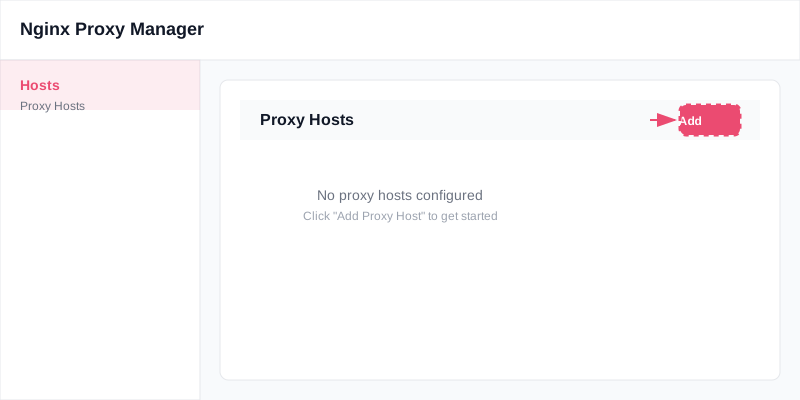
Click on Hosts > Proxy Hosts and click "Add Proxy Host".
Fill in the Details
This is the most important step. Fill in the fields exactly as shown below.
Request Your Free SSL Certificate
Now, click the SSL tab. From the dropdown, select "Request a new SSL Certificate." Then, check the boxes for "Force SSL" and "HTTP/2 Support." Finally, agree to the terms and click Save.
You're Done!
Congratulations! The process is complete. You can now access your secure, professional n8n instance at https://n8n.yourdomain.com.
🎉 Your n8n is now secure and professional!
Your automation workflows are now accessible via a secure, professional domain with automatic SSL encryption.
Frequently Asked Questions
Because both n8n and Nginx Proxy Manager are running in Docker, they can communicate with each other using their container names. It's a more stable and secure method.
The most common reason is that your DNS A record has not had enough time to propagate across the internet. Wait 15-30 minutes and try again. Also, ensure your server's firewall is not blocking ports 80 and 443.
Yes! This is the best part. You can now repeat Steps 3-5 for any other service you run (like a WordPress site or a dashboard), giving each one its own secure, professional domain name.
You'll need to install Docker first. Most VPS providers have one-click Docker installation options, or you can follow Docker's official installation guide for your server's operating system.
Yes, you can change the port by modifying the Docker command. Replace -p 81:81 with -p YOUR_PORT:81. Just make sure the port you choose isn't already in use by another service.
Log back into your domain registrar's DNS settings and update the A record to point to your correct server IP address. After making the change, wait 15-30 minutes for DNS propagation before testing again.
Nginx Proxy Manager automatically renews Let's Encrypt certificates before they expire. However, if renewal fails, you can manually request a new certificate through the NPM dashboard's SSL tab.
Yes, you can create a proxy host without SSL first for testing. However, many webhooks and services require HTTPS, so it's recommended to set up SSL as soon as possible.
This usually means Nginx Proxy Manager can't reach your n8n container. Check that your n8n container is running with the name "n8n" and is on the same Docker network as NPM. You can verify this with docker ps and docker network ls.
Your NPM data is stored in Docker volumes. You can backup the volumes with docker run --rm -v npm_data:/data -v $(pwd):/backup alpine tar czf /backup/npm_data_backup.tar.gz -C /data . This creates a backup file in your current directory.