
n8n MCP Ultimate Guide 2025
Stop dragging and dropping nodes for hours. Generate complex n8n workflows with AI using natural language.
Start Readingn8n MCP: Solving the Scaling Challenge
The Manual Workflow Challenge
While n8n is fantastic for building powerful automations, creating a 50-node workflow can be time-consuming. You have to find the right nodes, wrestle with complex JSON data mapping, and manually connect and configure every step.
Hours of Trial and Error
For complex logic, this can take hours of trial and error. You spend more time debugging connections and data mappings than actually building your automation logic.
The Solution: n8n MCP
n8n MCP was created to eliminate this manual work. It allows you to describe your automation goals in natural language and automatically generates the complete workflow structure.
Steep Learning Curve
n8n's power comes with complexity. New users often struggle with understanding node configurations, data transformations, and advanced features like expressions and functions.
How n8n MCP Works
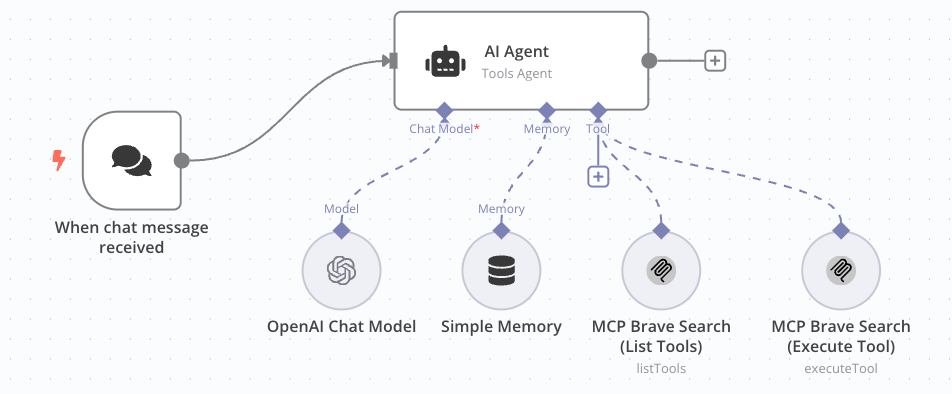
You Prompt Your AI Assistant
Start by describing your automation goal to any AI assistant that supports the n8n MCP client. This could be Claude in Cursor, a custom GPT, or any AI tool with MCP capabilities. Simply say something like: "Create a workflow that sends a daily summary of new Shopify orders to a Slack channel with order totals and customer details."
The n8n MCP Server Processes Your Request
Your AI assistant connects to the n8n MCP server (running via Docker on your infrastructure). This server contains deep knowledge of the n8n platform—every node, parameter, and connection pattern. It translates your natural language request into a precise, executable workflow structure with proper JSON formatting, node configurations, and data mappings.
Your n8n Instance Builds the Workflow
The n8n MCP custom node in your n8n instance receives the structured workflow data from the MCP server. It then automatically creates the complete workflow on your canvas—including all nodes, connections, parameters, and even data transformations. The workflow is ready to run immediately, with proper error handling and data mapping already configured.
n8n MCP Key Features
Natural Language Generation
Describe, don't build. Create entire multi-step workflows from a single, detailed sentence. No more dragging and dropping nodes manually.
Context-Aware Building
The n8n MCP server is designed to let the AI understand your existing setup, credentials, and custom nodes for more accurate results. It maintains context across your entire n8n environment.
Rapid Prototyping & Debugging
Instantly generate a draft workflow to test a complex idea. If something is broken, you can even ask the AI to help you debug it.
Open Source & Self-Hosted
Maintain full control and privacy. The entire n8n MCP stack runs on your own infrastructure via Docker, keeping your data secure and under your control.
n8n MCP Use Cases
E-commerce Automation
Create workflows that automatically sync inventory between Shopify and WooCommerce, send order notifications to Slack, and update customer databases in real-time. Perfect for online stores managing multiple sales channels.
Customer Support Workflows
Build intelligent support systems that automatically categorize tickets, assign them to the right team members, send follow-up emails, and create knowledge base articles from resolved issues.
Data Processing & Analytics
Automate complex data pipelines that collect data from multiple APIs, transform and clean the data, run analytics, and generate automated reports with visualizations sent to stakeholders.
Marketing Automation
Create sophisticated marketing workflows that segment leads based on behavior, send personalized email sequences, track engagement metrics, and automatically adjust campaigns based on performance data.
n8n MCP Requirements
Server Requirements
Minimum 2GB RAM, 1 CPU core, and 20GB storage. Recommended: 4GB RAM, 2 CPU cores for optimal performance. Any VPS or cloud server running Ubuntu 20.04+ or CentOS 8+.
Docker Environment
Docker and Docker Compose must be installed and running. The entire n8n MCP stack runs in containers, ensuring consistent deployment across different environments. If you're new to Docker, check our n8n installation guide for Docker setup instructions.
Network Access
Outbound internet access for AI API calls (OpenAI, Anthropic, etc.) and GitHub access for downloading the n8n MCP components. Port 5678 for n8n web interface. For production deployments, consider securing your n8n instance with HTTPS and proper firewall rules.
AI API Access
Valid API keys for your chosen AI service (OpenAI GPT-4, Anthropic Claude, etc.). The n8n MCP server will use these APIs to generate workflows based on your descriptions. For discount codes on hosting services, check our n8n hosting deals.
n8n MCP Installation
Deploy the n8n MCP Server
Clone the n8n MCP server repository and deploy it using Docker. This server acts as the bridge between your AI assistant and n8n, containing all the knowledge about n8n nodes and workflows.
docker run -d --name n8n-mcp-server -p 3000:3000 czlonkowski/n8n-mcp
Install the n8n MCP Custom Node
Add the n8n MCP custom node to your existing n8n instance. This node will receive workflow data from the MCP server and automatically create workflows on your canvas.
Configure Your AI Assistant
Set up your preferred AI assistant (Claude in Cursor, custom GPT, etc.) to connect to the n8n MCP server. Configure the API endpoints and authentication for seamless communication.
http://your-server:3000
Test Your Setup
Create your first AI-generated workflow by describing a simple automation to your AI assistant. Verify that the workflow is correctly created in your n8n instance and runs without errors. For backup strategies, see our n8n backup guide to protect your workflows.
Top n8n MCP GitHub Projects
n8n-io/n8n
n8n - Secure Workflow Automation for Technical Teams: Fair-code workflow automation platform with native AI capabilities. Combine visual building with custom code, self-host or cloud, 400+ integrations.
czlonkowski/n8n-mcp
A MCP for Claude Desktop / Claude Code / Windsurf / Cursor to build n8n workflows for you. Deploy in minutes to give Claude and other AI assistants deep knowledge about n8n's 525+ workflow automation nodes.
Zie619/n8n-workflows
A professionally organized collection of 2,053 n8n workflows with a lightning-fast documentation system that provides instant search, analysis, and browsing capabilities.
n8n MCP vs Other Tools
vs Zapier AI
n8n MCP Advantage: Complete control over your data and infrastructure. No vendor lock-in, unlimited workflows, and the ability to customize every aspect of your automation. Zapier AI is limited to their platform and pricing tiers. For hosting recommendations, check our Hostinger n8n hosting review for cost-effective solutions or RackNerd VPS for high-performance options.
vs Make.com AI
n8n MCP Advantage: Open-source flexibility with 400+ integrations vs Make's limited ecosystem. You can create custom nodes, modify existing ones, and integrate with any API or service without restrictions. For managed hosting solutions, consider Cloudways managed VPS for hassle-free deployment.
vs Custom GPTs
n8n MCP Advantage: Direct workflow generation vs GPTs that can only provide guidance. n8n MCP actually creates executable workflows in your n8n instance, while GPTs just give you instructions to follow manually.
vs Traditional n8n
n8n MCP Advantage: AI-powered workflow generation vs manual node-by-node building. You get the full power of n8n with the speed and intelligence of AI, reducing development time from hours to minutes.


WHY TRUST US?
n8n MCP Expert Insights
Hi, I'm Alex – a web developer and automation specialist who's been exploring the intersection of AI and workflow automation for years. I've seen firsthand how AI can transform the way we build complex automations.
That's why I'm excited about n8n MCP: it represents the future of workflow development. By combining the power of AI with n8n's flexibility, we can now build sophisticated automations in minutes instead of hours. For comprehensive n8n hosting solutions, explore our hosting guides.
My mission is to help you leverage the latest AI technologies to supercharge your n8n workflows. n8n MCP is a game-changer that makes complex automation accessible to everyone, regardless of their technical expertise.
n8n MCP FAQ
It's a standardized way for an AI (the Model) to get information (Context) about a specific application (like n8n). This context allows the AI to generate outputs that are accurate and functional within that application, instead of just guessing.
No, n8n MCP is a powerful, community-driven open-source project created by dedicated n8n users. It showcases the extensibility of the n8n platform.
The project is designed to be flexible. It's primarily demonstrated with models accessible via API, with popular guides focusing on the OpenAI API (for custom GPTs), Claude in Cursor, and other AI assistants that support the n8n MCP client.
It's designed for users who are already comfortable self-hosting n8n. If you were able to follow our guide to install n8n with Docker, you will be able to follow the instructions on the GitHub repositories to deploy the n8n MCP server and install the n8n MCP custom node.
Yes, as long as the AI assistant can make API calls to the n8n MCP server. This includes custom GPTs, Claude in Cursor, and other AI tools that support the n8n MCP client and external API integrations.
That's the beauty of n8n MCP! You can ask the AI to debug and fix the workflow. The AI understands the n8n context and can help you troubleshoot issues, making it much faster than manual debugging.
Yes, since the entire stack runs on your own infrastructure, your data never leaves your control. The MCP server only receives your workflow descriptions, not your actual data or credentials. For additional security measures, see our n8n security guide.
Absolutely! n8n MCP can understand your existing setup and build upon it. You can ask it to add new nodes to existing workflows or create entirely new workflows that integrate with your current automations. For workflow backup strategies, check our n8n backup guide.